
777 Casino Verification
Step-by-step 777 Casino verification guide for New Zealand players: what to prepare, common problems, fixes and myths.
What to do if verification does not work
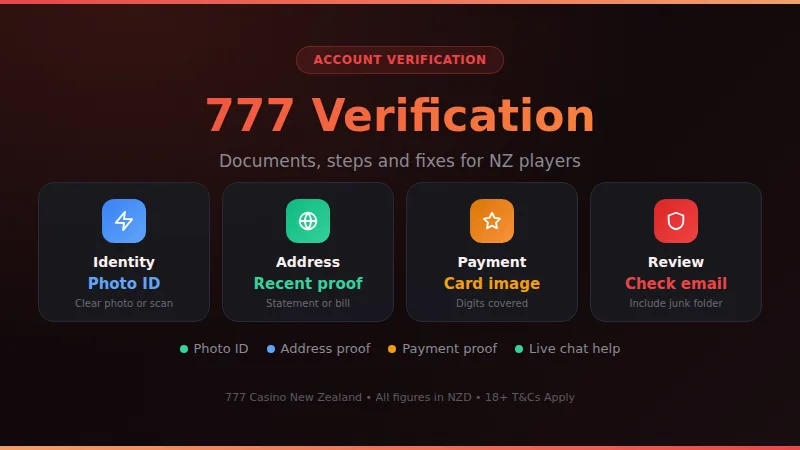
Verification at 777 Casino means confirming who you are by sending identity and address documents from your account, often before a first withdrawal. Prepare a clear photo ID and a recent proof of address, upload them in the account area, and use live chat if a file is rejected or the review stalls.
When a check stalls or bounces back, the cause is almost always something small: a blurry photo, a document with a cut-off corner, or details that do not match the account. Before you contact anyone, work through the list below in order. It costs you a few minutes and clears most cases without waiting for a reply from the team.
-
1
Read the rejection message
Open the email or account notice and note exactly which document was refused and the reason given.
-
2
Compare your details
Name, date of birth and address on the account must match your documents letter for letter, including middle names.
-
3
Retake the files
Use daylight, lay the document flat, show all four corners and avoid glare, filters and heavy cropping.
-
4
Check format and size
Stick to common formats such as JPG, PNG or PDF, and keep each file within the size limit shown in the upload form.
-
5
Switch browser or device
Clear the cache or move between phone and laptop if the upload button freezes or the progress bar never finishes.
-
6
Ask live chat
Give your username, the document type and the upload time, then ask for the exact reason a file was not accepted.
If pages will not load at all, look at the 777 Casino status page before assuming your files are the problem. A slow or unavailable site can make an upload look like a failed document when nothing is wrong with it. Keep a short note of each chat: the date, what you were told and what was promised. A follow-up that quotes that note moves faster than starting the case again from zero.
Common verification problems
Most players run into the same handful of issues. The table lists the usual ones with the likely cause and the quickest fix, and the explanation underneath covers the details that do not fit into a cell.
| Problem | Likely cause | Fix |
|---|---|---|
| Blurry upload | Low light | Retake photo |
| Cropped corners | Tight framing | Show full document |
| Name mismatch | Nickname used | Match account |
| Old address proof | Outdated document | Send recent one |
| Wrong file type | Unsupported format | JPG or PDF |
| Upload freezes | Large file | Compress image |
| Card proof refused | Digits visible | Cover middle digits |
| No reply | Queue or spam | Check junk folder |
Cover the middle digits of a card, but leave the first six and last four readable only if the request asks for them. The name on a bank statement or utility bill should be the name on the account, and the document should be recent enough to show a current address. If a file is large, resize it rather than splitting it into several partial images.
Typos in your profile
A single wrong letter in your surname or street name can fail an otherwise perfect document. Fix the profile first, then upload again.
Currency confusion
777 Casino accounts run in USD, GBP, EUR or CAD, not NZD, so amounts on your NZ bank statement may differ from the cashier history.
Bonus funds locked
FreePlay and free spins winnings are restricted funds. They stay locked under the bonus terms whether or not your documents are approved.
Email lost in spam
Requests for extra documents arrive by email and in your account. Check junk and promotions folders, and add the site address to your safe senders.
Another frequent trigger is changing details mid-process: a new address, a new phone number or a different deposit method while a review is open. If something in your life has changed, tell live chat before you upload, so the new documents and the account agree.
- Photo ID: a passport or a New Zealand driver licence, in date, with all edges visible.
- Proof of address: a recent bank statement, utility bill or council rates notice showing your name and address.
- Proof of payment: a photo or screenshot of the card or e-wallet you used, with sensitive digits covered.
- A selfie holding your ID, only if the request specifically asks for one.
- Anything else the request names. Read the wording carefully, because it can differ from the usual list.
Step-by-step with screenshots
The process is the same in spirit on phone and desktop: sign in, find the place where documents go, upload clean files and keep proof that you did. Labels and menu positions can change between layouts, so follow the logic of each stage rather than hunting for an exact button name.
Annotated screenshots of each stage, from opening the account area to the confirmation message, so you can follow along on your own screen.
-
1
Log in securely
Sign in to your 777 Casino account on your own connection, not public Wi-Fi, and make sure the address bar shows the real site.
-
2
Open your profile
Look for the profile, account or verification area. The wording differs between layouts, but documents are managed there.
-
3
Pick the document type
Choose photo ID first, then proof of address, and proof of payment if the request lists it.
-
4
Upload clear files
Add each file in turn and wait for the tick or confirmation message before adding the next one.
-
5
Screenshot the confirmation
Save an image of the success message with the date visible. It helps if a file goes missing.
-
6
Watch your inbox
Check email and account notices, including the junk folder, for a follow-up request or an approval message.
- Photo ID
- Passport or NZ licence
- Address proof
- Recent statement or bill
- Payment proof
- Card image, digits covered
- File format
- JPG, PNG or PDF
- Photo quality
- Sharp, no glare
If you pay by card, a debit card keeps things simpler, because a credit card deposit counts as a cash advance in New Zealand. The method you used also decides which proof of payment you may be asked for, so look over the payment methods page before you deposit. Once the documents are approved, payout speed depends on the method, which the withdrawal times page explains.
Preparing your documents in advance
The easiest verification is the one you have already prepared for. Set aside ten quiet minutes before your first deposit and gather everything in one folder on your phone or laptop. Name each file clearly, such as passport-front or bank-statement, so you can find it quickly when a request arrives. Check that every document is in date and that the name matches the one you typed when you registered.
Strengths
- Withdrawals are not held up by a missing file.
- You can answer a document request within minutes.
- Fewer rejections, because you have already checked quality and details.
- Your own tidy copies make any follow-up chat quicker.
Worth knowing
- It takes a little time before you have even started playing.
- You need a scanner or a phone camera and decent light.
- Documents must be refreshed if your address or name changes.
Keep the originals safe and never send a photo of a document to anyone who messages you first. Genuine requests come through your own account or the site's official email, and the team will not ask for your password. If you ever doubt a message, ignore the link and sign in directly to check for notices instead.
Myths and misconceptions
Verification is a penalty
It is a routine identity check that protects your account and balance. Being asked for documents does not mean you did anything wrong.
A selfie replaces documents
A selfie on its own rarely stands in for ID. When one is requested, it is normally held next to your document to match the face.
Blurry is good enough
A hard-to-read file is the most common reason for rejection. A sharp photo in good light saves you a second round of uploads.
More files mean faster approval
Sending duplicates or unrelated papers clutters the review. Send exactly what the request lists, in the order it lists them.
A small deposit skips the check
Do not assume the size of a deposit exempts you. Requests can arrive at any stage, so keep your documents ready. See minimum deposit for deposit details.
Withdrawing forces approval
Requesting a payout does not speed the review, and it forfeits restricted funds that are not yet converted to available funds.
The practical lesson behind all of these is simple: treat verification as a one-time admin job and do it carefully. A tidy set of documents prepared in advance turns it from a stressful delay into a short task, and it keeps your later withdrawals smooth.
Once the check is done you can get back to the lobby, with live tables and slots from studios like these, and enjoy the games without paperwork hanging over your balance. Being verified early means your attention stays on playing, not on chasing a missing file.
Verification questions answered
How long does 777 Casino verification take?
777 Casino does not publish a fixed review time, so plan for a short wait rather than instant approval. The biggest factor you control is sending sharp, complete files the first time. If you hear nothing, check your junk folder and then ask live chat for a status update. Payout timing after approval is covered on the withdrawal times page.
Do I have to verify before I can play?
Requirements can differ from account to account. Many casinos let you deposit and play first, then ask for documents before a withdrawal. Watch your email and account notices, and if a request appears, deal with it promptly so it never delays a cash-out.
Which documents will I need?
Commonly a photo ID such as a passport or New Zealand driver licence, a recent proof of address like a bank statement or utility bill, and proof of the payment method you used. Read the actual request in your account, because it names exactly what is needed for your case.
Is it safe to upload my ID?
Upload only while logged in to the real site, on a connection you trust. Do not send documents through social media or to anyone who contacts you first. Cover the middle digits of any card image and keep your own copy of what you sent.
Can I verify from my phone?
Yes. The site works in a mobile browser, so you can photograph a document and upload it straight away. Make sure the photo is sharp, flat and fully in frame, and wait for the confirmation message before closing the page.
Does my account currency matter for verification?
Accounts at 777 Casino run in USD, GBP, EUR or CAD, not NZD. That does not stop verification, but amounts on your NZ bank statement may differ from the cashier history, so keep both handy if you are asked to explain a payment.
What if my documents are rejected more than once?
Ask live chat for the exact reason each time, then compare the file against it line by line: name, date, edges, glare and format. Keep a note of every reply and quote it in your next message, so the team can see the history at once.
Can I withdraw bonus winnings while I am waiting?
It is better not to. A withdrawal request forfeits restricted funds such as FreePlay or free spins, along with related winnings not yet converted to available funds. Let the document review finish first, then check your balance before you request a payout.
Try 777 Casino in NZD
Open the lobby, check the cashier in New Zealand dollars and set your own limits before you deposit.
18+ • Play Responsibly • Terms & Conditions Apply